Hypotheses
The Hypotheses page keeps the story behind your runs: what you were testing, which runs tested it, what you concluded, and which run gave you the next idea. Its Board view draws that story as a tree of cards you read left to right; its Timeline view lists the same runs by date.
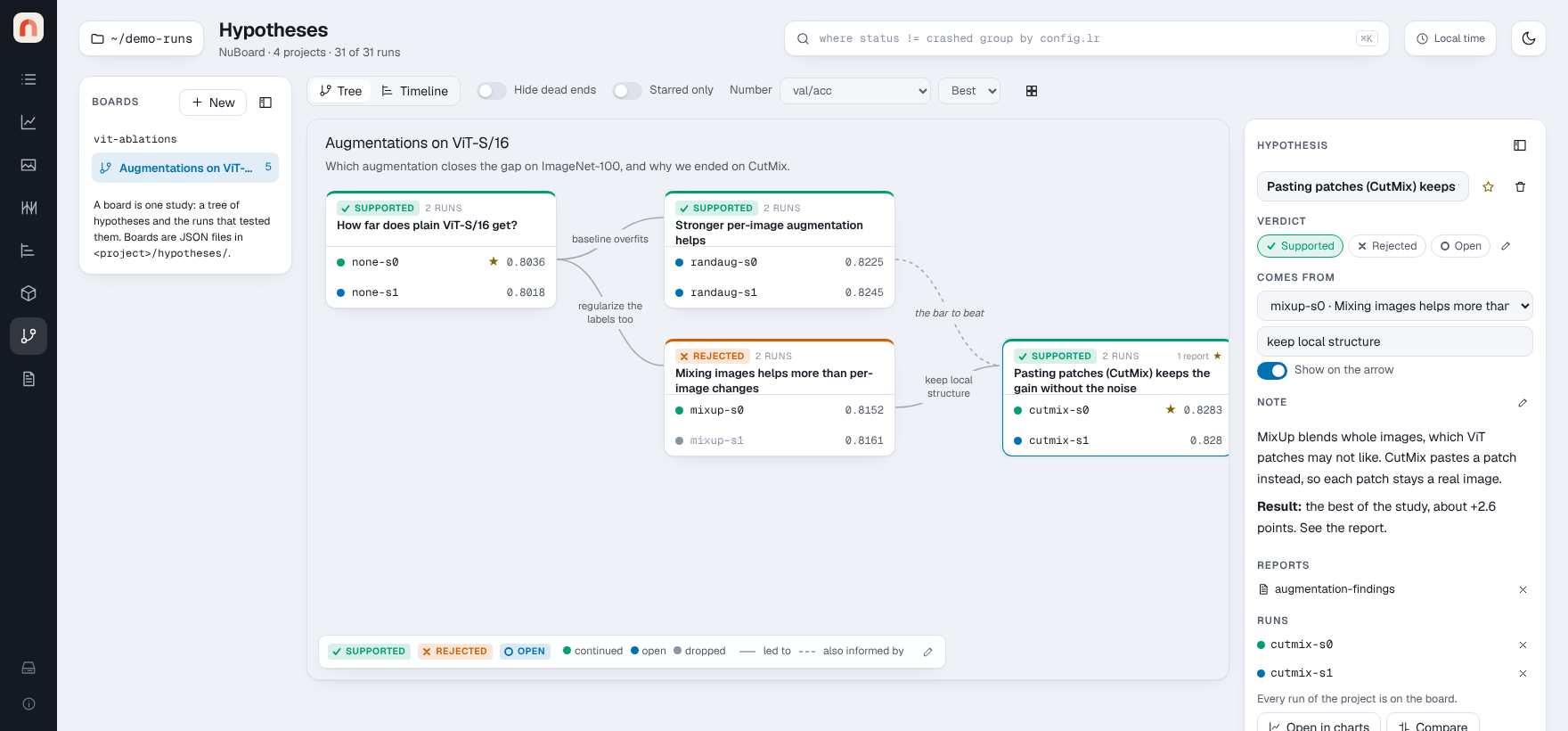
Try it on the demo: nuboard demo demo-runs --up --open, then open
Hypotheses in the left rail. The board Augmentations on ViT-S/16, in
vit-ablations, goes from a baseline to RandAugment and MixUp,
then to CutMix, and ends on a planned card that has no runs yet.
Boards, cards and arrows
- A board is one tree of hypotheses in a project. A project can have
several boards, one per study. The Hypotheses list on the left shows every
project's boards (or only the project picked in the workspace), like the
Reports list; press New to start one.
[folds the list. Each board can have a title and a description, shown above the cards. - A card is a hypothesis: a question or an idea, the runs that tested it, and a verdict (by default Supported, Rejected or Open), shown as a badge and as the color of the card's top edge.
- Each run on a card has an outcome: did you keep building on it? By default it is Continued, Open or Dropped. Dropped is a dead end: it is struck through, and Hide dead ends hides it.
- An arrow leads from a run to the hypothesis it led to. Its text says why. Click the text to edit it, or the small + on an arrow without text to add some. Clear the text to show a bare arrow.
- A dashed arrow ("also informed by") shows that another run fed into the idea without being its parent.
A run belongs to at most one hypothesis on a board, but the same run can appear on several boards.
Working with the board
- Start: press + at the start of the bar at the bottom of the board (or click the empty canvas to clear the selection) and fill in the form in the side panel: the question and, if you like, the first run that tests it. A board can have several starting points; a hypothesis with nothing under Comes from is one.
- Add runs: open a card and use Add a run…. The list offers the project's runs that are not on the board yet.
- Follow up: click a run, write the next hypothesis under Follow up and say why. The new card appears to the right with an arrow from that run.
- Write it down: a card has a Markdown note and can link the project's reports. A run has a conclusion. Both show in the side panel on the right, which folds away with its sidebar button.
- Star runs and cards that matter. Starred only keeps just the paths through them.
- The number on each run is one metric, picked under Number in the toolbar (its best, last, min or max value). A card can pick its own under Number on this card; its header then names that metric. Hover a number to see which metric and value it is.
- Compare: Shift-click runs, on one card or across cards, to open them together in Charts or Compare. A card's Open in charts does the same for all of its runs.
- Hover a run or a card to highlight the path through it.
- Fold: cards with more than five runs fold to their key runs (starred, best, running, missing, selected, and runs an arrow starts from). Click N runs ⌄ under the verdict to fold or unfold.
- Arrange: drag a card by its header to move it. The grid button puts every card back in its automatic place.
- Categories: the pencil at the end of the legend edits the verdicts (name, color, icon) and the outcomes (name, color, dead end) of the board. Each list holds up to eight.
Timeline (next to Board in the toolbar) lists the runs of the board in the order they started, with one lane per hypothesis and a curve where a hypothesis grew out of an earlier run.
Missing runs and reports
A board refers to runs by id and to reports by name. When a run is deleted, moved or not loaded, its row stays on the card, greyed out and marked not found, with its conclusion kept. Remove it from the side panel if it is gone for good. A linked report that no longer exists shows the same way. A board with a broken or hand-edited file still opens: unreadable files are skipped and unknown values fall back to defaults.
Where it is stored
Each board is a folder of plain JSON in the project,
<project>/hypotheses/<board>/, with board.json for the board and one
<id>.json per hypothesis. You can commit it to git with the project, or edit
it by hand. See File format.
nuboard up --read-only-reports makes boards read-only too.