Choosing a step
After a round of experiments there are often several models that each win on something: one has the best accuracy, another the best calibration, a third is faster. The Select page helps decide which run, at which step, to take forward. It does not decide for you. It removes the steps that are simply worse, shows what each of the remaining choices costs, and keeps a note of what you picked and why.
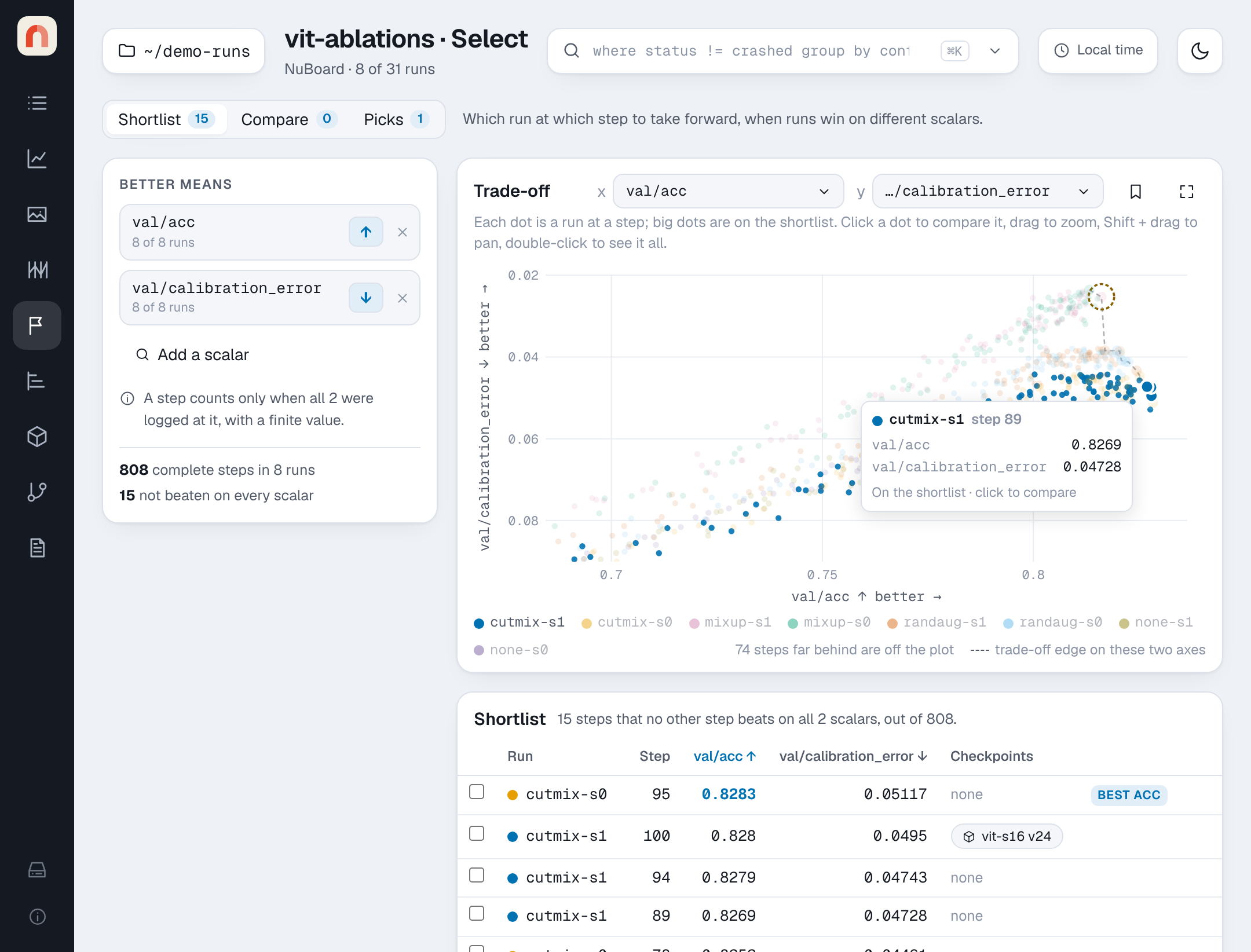
Try it on the demo: nuboard demo demo-runs --up --open, open Select on
vit-ablations and add val/acc and val/calibration_error under Better
means. The eight runs trade accuracy against calibration: CutMix is the
most accurate, MixUp the best calibrated, and later epochs gain accuracy
while calibration drifts back. Checkpoints are saved at epochs 60, 80 and
100, and one pick is already made.
What a candidate is
A candidate is one run at one step, scored on the scalars you already log for Charts. Nothing new needs to be logged.
A step counts only when every chosen scalar was logged at it, with a
finite value. If you log train/loss every step and val/acc every 1,000
steps, the candidates are the steps where both were logged: every 1,000th.
Log the scalars you want to judge by together, at the same step, as an
evaluation usually does.
The shortlist
Add the scalars that matter under Better means, and check the arrow next to each: ↑ higher is better, ↓ lower is better. The arrow comes from the project's saved directions (see Which way is better); a dashed arrow is a guess from the name. Clicking it flips it for this view only.
The shortlist holds the steps that no other step beats on every scalar at once (the Pareto front). A step that another step matches or beats everywhere is left out, since there is no reason to choose it. What remains are real trade-offs: each step on the list is better than every other one on at least one scalar. Best badges mark the best value of each scalar.
The trade-off plot shows two of the scalars at a time, with better to the right and up. Big dots are the shortlist, small dots the other steps, and the dashed line the edge of what is reachable on those two axes. Steps far behind (the 10% worst on an axis) are left off so the plot stays on the part where the choice is made. Click a dot, or tick a row, to compare it.
The plot works like the charts elsewhere:
- Hover any dot, big or small, to see its run, step and values: the two scalars on the axes first, and up to six in all (the shortlist has every one). The run's other steps stand out, and hovering a run in the legend does the same.
- Drag a box to zoom in. Ctrl/⌘ + wheel (or a pinch) zooms around the cursor, Shift + drag pans, and double-click or Reset zoom shows it all again.
- The buttons at the top right add the plot to a report and show it full screen.
Runs that are not ranked
A run that never logs one of the chosen scalars cannot be compared fairly, so it is not ranked rather than judged on fewer numbers. Each scalar shows how many runs log it (such as "7 of 8 runs"), and Not ranked under the table lists the runs left out and what they miss. Removing that scalar ranks them.
Comparing and picking
Compare puts the chosen steps side by side: the value of each scalar (in bold where it is the best of the steps compared), its rank on the shortlist (such as "#2 of 15"), and a small curve of the whole run with the step marked, which shows whether the run was still improving or already drifting. Summary lists, for each step, the scalars it is the best and the worst on among the steps compared. Below are the config keys that differ and the artifacts the run logged at that step.
Pick this step asks why, and which artifact (such as a checkpoint) goes
with it. The pick is
saved in the project's picks.json, with the scalars' values and directions
at the time, so it can be committed to git and read later. Picks lists
them; each pick can be opened in Charts, edited or removed.
Artifacts at a step
The Artifacts column lists the artifact versions a run logged, next to
the step they belong to. A checkpoint file saved to disk without
add_artifact is not listed: log it as an artifact, with its step:
run.add_artifact("model", "ckpt/", type="checkpoint", step=step)
A version without a step (or with a whole-number step in its metadata) is
placed at the last step logged before it was made, which is right when the
checkpoint is saved after the evaluation. A step can have several
checkpoints, or none: a pick can be made before any checkpoint exists.